

IDENTIFY IMPACTED POLICIES
Identifying policies, Policy Owners and their Agents that have policies with insufficient long term care coverage takes seconds using NIC's policy filters.
Using the specific details of the targeted policies (those policies with insufficient coverage), filter your in force book by:
-
Carrier
-
Product Type
-
Policy Effective Date Range

-
Now that you have identified impacted policies, select all of the policies on the screen by checking on the box at the top of the table, beside the first column
-
When then blue box appears, click on Select all xxx records
-
Click on Add to list link

SAVING YOUR IDENTIFIED POLICIES
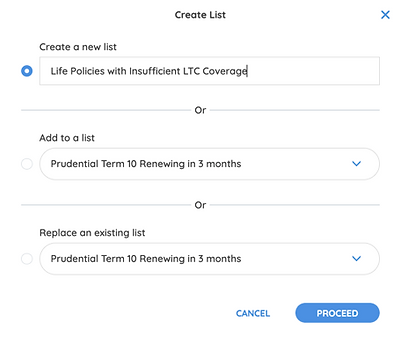
Clicking on Add to list will present you with few options:
-
You can save the list as a new list Create a New List
-
You can Add to an Existing List and then select an existing list to add the records to
-
Replace an Existing List to replace a currently existing list with a new one containing new records
SAVED LISTS
Your new list will be saved in your Lists folder, accessible from the left nav.

SHARING THE LIST WITH YOUR AGENTS
Now that you have your Insufficient LTC Coverage Policies list, you can share that list with your Agent.
-
Under the Actions header, click on the kebab menu and select Send to Agents

A pop-up window will open.
-
Select the Also send the agent an email notification box if you would like your Agent to receive an email alerting him/her about the list you are sharing.
-
Type in any message you would like to share with your Agent
-
Click Send List

Your Agent will receive an email notification from NIC.
The notification email will contain your name as the user sharing the list, and also a link to the Agent App so the Agent can click on it to get direct access to the Agent App Login page, where they can see the shared list.
NOTE:
-
LOG IN link appears for Agents already on NIC platform and will take the Agent to the NIC Advisor App login page.
-
JOIN US link appears for Agents who are not on NIC platform but are part of your list. If they wish to subscribe to the NIC Advisor App all they have to do is click on Join Us and complete the short onboarding process.


AGENT IN-APP NOTIFICATIONS
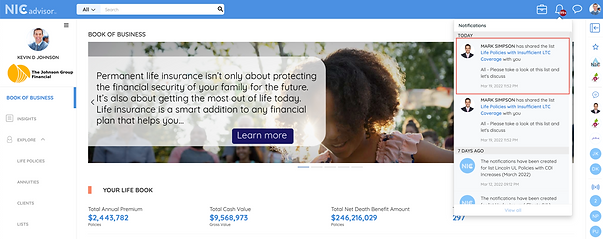
In addition to email notifications, NIC also generates
In-App Notifications for your Agent, along with your message.
AGENT SHARED IST
Clicking on the notification (email or in app) will take the Agent directly to their list of Insufficient LTC Coverage Policies list that you have generated and shared.

AGENT LISTS
The list will also be saved under Lists in the NIC Advisor App.
