

HOW TO FIND POTENTIAL LIFE SETTLEMENT OPPORTUNITIES?
NIC DISTRIBUTOR APP HOME PAGE
The Home page is a jump-off point to all application features and services.

AGENT LIFE POLICY GRID
The Agent Life Policy Grid provides access to your Agent's in force book and the ability to slice and dice their data based on what your are looking for.
The opportunities are limitless!


FINDING MARKET VALUE OPPORTUNITIES FOR AGENTS
AGENT SEARCH
-
Click on the Search drop-down menu at the top menu bar
-
Type the Agent's name
-
From the Search results page, select the Agent you are looking for

AGENT PROFILE
The Agent Profile page provides access to information about the Agent as well as their book of business, insights into their data, sales trends and other information.
-
To locate Market Value Opportunities for the Agent click on the Explore button
-
To view Market Value opportunities, make sure the Market Value column is turned on in your view
TURNING ON THE MAKET VALUE COLUMN
-
Click on the Settings icon, and scroll down until you find Market Value
-
Click on the check box beside Market Value label
If the Market Value is not on the list, contact your BGA Super User.

MARKET VALUE
-
Click on the Market Value header to sort by the Market Value
-
Clicking on the column once sorts the values in the ascending order, clicking on the column twice will sort the values in the descending order

MARKET VALUE OPPORTUNITY DETAILS
-
To see the Market Value details click on the Policy Owner name. This will take you to the Policy Owner profile.

-
The Policy Owner Profile lists all policies owned by the selected Policy Owner.
-
To see the Market Value, click on View Details button and scroll to the bottom of the page.
-
There are 6 Market Value figures, based on the health of the Insured
-
To learn more about the Market Value for a specific policy, click on Contact Me About this Opportunity and a Life Settlement Specialist will contact you within 24 hours

CREATING LISTS OF MARKET VALUE OPPORTUNITIES
-
To save your Agent's Market Value opportunities, select the policies that you want to save by checking the box beside the policy # column
-
Or you can select all of the policies on the screen, or all of the policies in the pre-defined list by checking on the box at the top of the table, beside the first column
-
When then blue box appears, click on Select all xxx records
-
Click on Add to list link

SAVING YOUR LIST
Clicking on Add to list will present you with few options:
-
You can save the list as a new list Create a New List
-
You can Add to an Existing List and then select an existing list to add the records to
-
Replace an Existing List to replace a currently existing list with a new one containing new records

SAVED LISTS
Your Market Value Opportunity list will be saved in your Lists folder, accessible from the left nav.

SHARING THE LIST WITH YOUR AGENTS
Now that you have your term renewal list, you can share that list with your Agent.
-
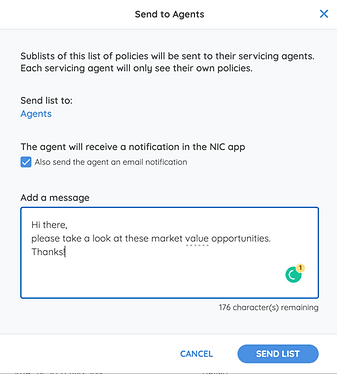
Under the Actions header, click on the kebab menu and select Send to Agents

A pop-up window will open.
-
Select the Also send the agent an email notification box if you would like your Agent to receive an email alerting him/her about the list you are sharing
-
Type in any message you would like to share with your Agents
-
Click Send List
Your Agent will receive an email notification from NIC.
The notification email will contain your name as the user sharing the list, and also a link to the Agent App so the Agent can click on it to get direct access to the Agent App Login page, where they can see the shared list.
NOTE:
-
LOG IN link appears for Agents already on NIC platform and will take the Agent to the NIC Advisor App login page.
-
JOIN US link appears for Agents who are not on NIC platform but are part of your list. If they wish to subscribe to the NIC Advisor App all they have to do is click on Join Us and complete the short onboarding process.
